
Get Started
The Marketing Email Design System (M-EDS) guidelines should be used as an extension of the Brand Guidelines within the email channel.
How to Use These Guidelines
Marketers should use these guidelines to learn how to design best-in-class emails and how to onboard American Express M-EDS assets to their creative agencies.
Agencies should use these as an instructional guide on how to leverage the M-EDS assets to design and build clean, fresh, engaging ‘on-brand’ American Express emails.

Important
The updated M-EDS guidelines and email assets highlight email channel best practices including enhanced accessibility standards and Dark Mode rendering. All marketers and agencies must ensure they are no longer using old code that is not compliant with the 4.2 update that includes the Deque remediation amends. This update is vital to ensure that all emails meet Amex accessibility and compliance standards.
About the M-EDS
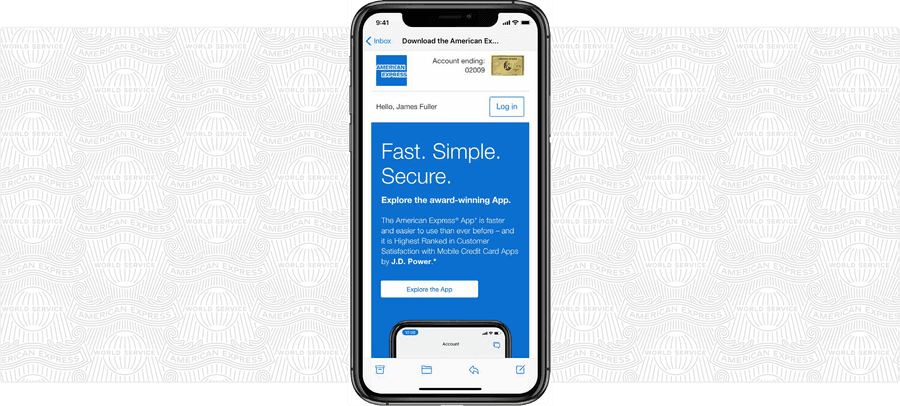
Email is one of the most powerful channels we have to reach our customers. Today, there are over 4.5 billion email users worldwide who send and receive more than 361 billion emails per day*, so getting ours to stand out from the crowd is becoming increasingly difficult.
The first iteration of the M-EDS was launched in 2017 in close collaboration with industry-leading email design experts. The objective was to deliver a design system that would convey a strong brand identity, cater to our marketing needs, incorporate industry best practices, and integrate feedback from our research.
Key to our success has been making our emails actionable, accessible, and easy to scan for all recipients. Our Card Members have dozens of email apps to choose from and interact with us using multiple devices. They may skim our emails using the Gmail app on their iPhone on the bus to work, use Outlook 2019 on their desktop work computer, or read and action using their iPad while sitting on the sofa at home in the evening. Our challenge is to have them display correctly and be engaging across all this technology.
The clean, modern designs, produced in line with Brand Guidelines, support logical content hierarchy while being visually appealing, with strong, action-orientated headlines and evocative imagery. Most importantly, they look as good on mobile as they do on desktop.
In addition, we provide coded HTML files for agencies to use in order to reduce the number of rendering and display issues, whilst catering for the devices and clients our customers use most.
In simple terms, our emails are now much easier, quicker and more cost-effective to produce, and should ultimately get a better reaction from our Card Members too. These Guidelines explain how to achieve this.
- Source: Statista 2024
Design and HTML Files
The M-EDS is available in Figma, Sketch and Photoshop formats. If using Photoshop or Sketch, please download the correct files for your market.
Figma M-EDS
The M-EDS has two library files which are available in Figma.
Follow the Design Guild figma onboarding to add the Design System Libraries within Figma.
Photoshop and Sketch Design Files - US Download
Only use this kit for emails deployed in the US market.
Files included:
- Start Here PSD
- Content Module Files PSDs
- Kinetic Module Files PSDs
- Full Kit (Sketch)
Photoshop and Sketch Design Files - International Download
Use this kit for any emails deployed in any market outside the US.
Files included:
- Start Here PSD
- Content Module Files PSDs
- Kinetic Module Files PSDs
- Full Kit (Sketch)
HTML Files - US
The HTML files can be downloaded from the US pack.
HTML Files - International
The HTML files can be downloaded from the International pack.
M-EDS Assets
The M-EDS assets, design files, guidelines, and HTML are available to download in two packs: US Pack and International Pack. Each pack contains the same core assets, with minor design variations specific to each market.
Download US Pack Download International PackSupporting Assets
The lists below detail all the assets and resources that are included in the downloaded file.
Email On Acid Download
Files included:
- Getting Started
- Manual Process
- My Inbox Help
- Custom Client Profiles
- Auto Process
- EoA Introduction EMEA
- EoA Introduction JAPA
- EoA Introduction LACC
Inbox Previewer Test Matrix Download
Files included:
- Testing Matrix
M-EDS Updates
The Marketing Email Design System (M-EDS) ensures brand consistency and thought leadership within the email channel. Updates to M-EDS incorporate stakeholder feedback, industry best practice, and third-party research. The advancements implemented since v.4.0 are outlined below.
M-EDS v.4.0
- Fluid responsiveness was added for edge to edge display on mobile devices
- Code was streamlined and generally improved
- 26 new modules were added, plus three new interactive modules
- Interactive buttons with hover states where supported
- Support for Benton Sans and Guardian headline styles via font imports
M-EDS v.4.1
- Color palettes and CTA links were optimized for Dark Mode display
M-EDS v.4.2
Following an audit by Deque, the M-EDS was amended to fix accessibility issues including:
- Color contrast of text and non-text elements
- Improved keyboard navigation
- Semantic code improvements
- Touch target size increased to 44px minimum
- Improved ARIA labelling and element focus
- Alignment with Design System 7 color palette
Questions?
Connect with the DLS Team on Slack or by email.
Resources
Check out additional resources.