
Preview Text
A short snippet of text that appears next to or beneath the subject line in most inboxes.
Overview
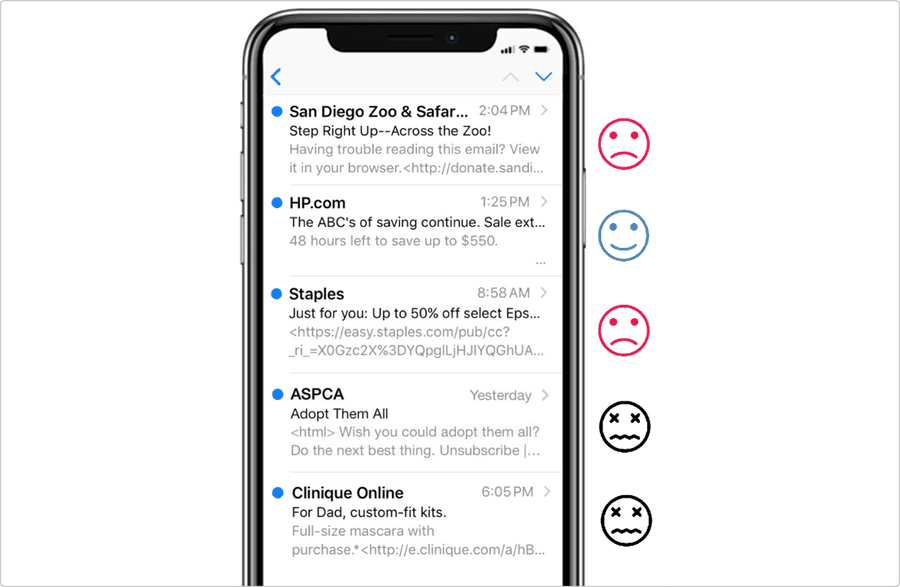
The Preview Text is important as it is an opportunity to convey a secondary marketing message. It gives recipients additional context about your email before they open it. Used effectively, preview text can significantly improve open rates, clarify the subject, and guide user expectation.
Often, twice as much Preview Text is displayed versus Subject Line, so take advantage of it to say a little more about your offer/promotion.
Why?
Some reasons why preview text matters:
- Extends your subject line: Preview text acts as a second chance to entice the reader
- Provides context: Helps clarify vague or short subject lines
- Drives engagement: A well-written preview can increase open rates
- Improves accessibility: Gives screen readers and inboxes more content to read aloud/display
Best Practices
Do this
- Use it to support, clarify, or contrast with the subject line
- Only the first 40–50 characters may be visible—make them count
- Start with important details or hooks, not filler
- Think of it as a secondary headline that expands the story
- Make it actionable or benefit-focused when possible
- Align preview text with the email’s message and brand voice
- Always use purposeful, crafted content
Don’t do this
- Avoid bait-and-switch tactics
- Don’t repeat the subject line – expand it
- Don’t include admin instructions – such as ‘view in browser’ in the first 50 characters of your preview text – it’s a wasted opportunity where a marketing message could have gone
- Don’t ask subscribers to add your email address to their address book – not necessary as Amex has good deliverability
Questions?
Connect with the DLS Team on Slack or by email.
Resources
Check out additional resources.