
Open Rates
Factors such as the subject line, sender’s reputation, personalization and email frequency can affect open rates.
Overview
Open rate is a key metric in email performance, representing the percentage of recipients who open an email out of the total delivered. While modern privacy updates (like Apple Mail Privacy Protection) have made open rates less precise, they still provide directional insight into the effectiveness of your email’s first impression.
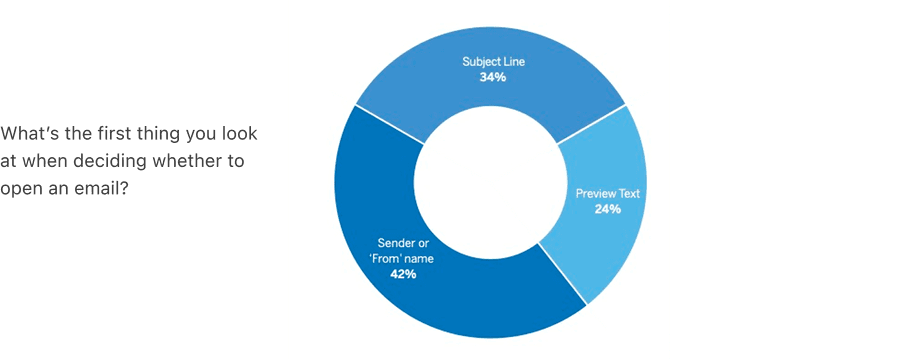
3 Elements That Influences Open Rates
Think of these elements as the outside of an unopened envelope, all three deliver a brand impression and tempt the reader to open it.
See the Subject Line and Preview Text sections for more information on how to optimize these elements to boost open rates.
Subject Line
The subject line is the first thing recipients see and heavily influences open behavior. It sets expectations and creates curiosity.
- Keep it short (35-50 characters) and clear
- Lead with value or urgency (e.g., “Your flight info - updated times”)
- Personalize when possible (e.g., “Hey Alex, your invoice is ready”)
- Avoid spammy words (e.g., “Free!!!” or “Act now!”)
- A/B test variations to learn what works for your audience
Sender or ‘From’ Name
The sender name tells recipients who the email is from. Recognition and trust in this name can determine whether the email is opened—or ignored.
- Use a consistent and recognizable name (e.g., “Acme Customer Support”)
- Humanize it when appropriate (e.g., “Sarah from Acme”)
- Avoid generic or no-reply addresses
- Match the sender name to the email’s purpose (marketing, support, updates, etc.)
Preview Text (Preheader)
Preview text appears next to or below the subject line in most inboxes. It acts as a secondary hook to encourage opens and give context.
- Complement the subject line—don’t just repeat it
- Use it to clarify the email’s value or next step
- Keep it within 35-90 characters for best display across devices
- Front-load important information (e.g., “Your refund has been processed”)
- Test different preview texts to see what resonates with your audience
Questions?
Connect with the DLS Team on Slack or by email.
Resources
Check out additional resources.