
Surface
Our design system has been carefully crafted to maximize content communication though a harmonious relationship between content and surface.
On this page
Applying Surfaces
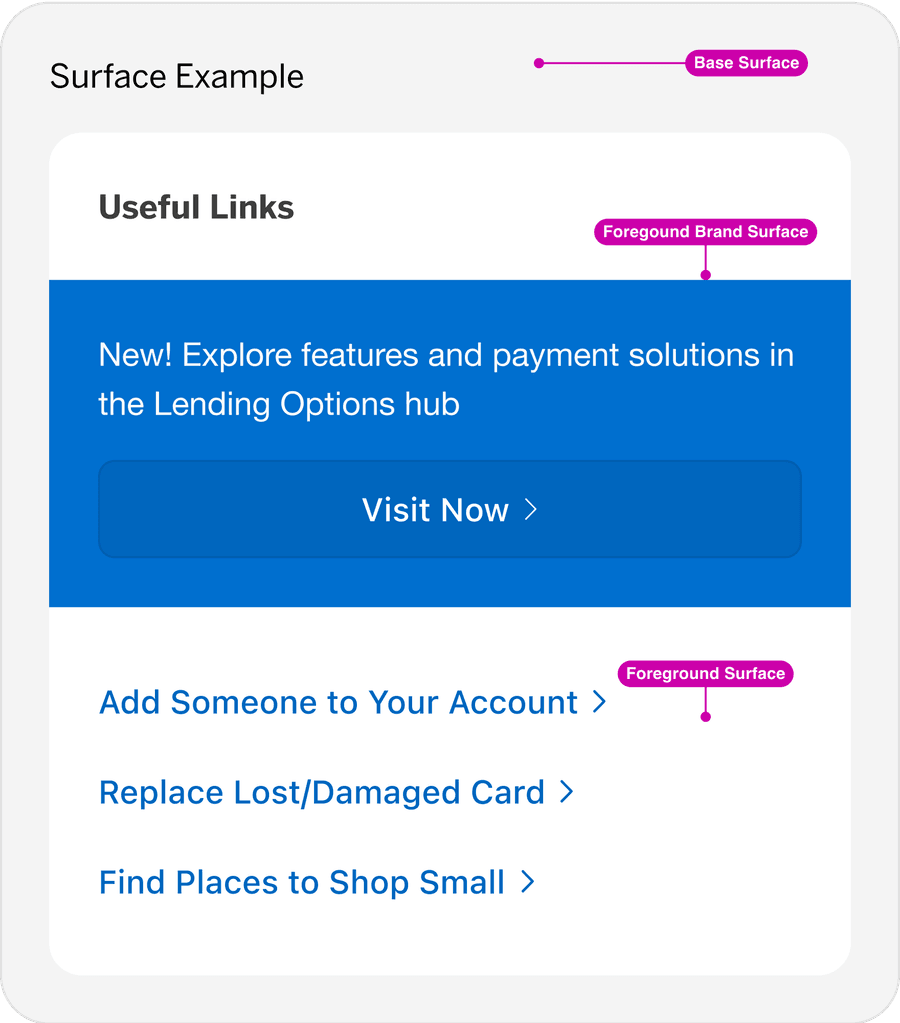
In our design system, components are structured to support consistent surface application across different themes, modes, and contexts. Developers can easily apply or adjust surfaces to fit their particular design needs, ensuring design consistency and accessibility without needing to manually alter styles in the stylesheet.
Application Principles
- Foreground Surfaces: Best for high-contrast areas such as headers and interactive elements where focus is needed. Apply foreground surfaces to elements that need contrast against the base, such as headers, highlighted areas, or cards, to draw user attention without overwhelming the layout.
- Base Surfaces: Ideal for backgrounds and larger sections. Use as the primary background layer for general content, providing a neutral backdrop that helps define sections and structure content.
- Brand Surfaces: Adds emphasis to high-impact actions, like CTAs, or highlighted features, and should be used sparingly to avoid overwhelming the design.
Use Cases
Page Background: Apply the base surface to large sections, grounding the layout.
Headers and Key Content: Use the foreground surface for sections requiring focus and contrast.
Primary Actions: Use brand surfaces to draw attention to calls to action.
Questions?
Connect with the DLS Team on Slack or by email.
Resources
Check out additional resources.