
Checkbox
Checkboxes allow users to select one or more items from a predefined list of independent options.
Anatomy
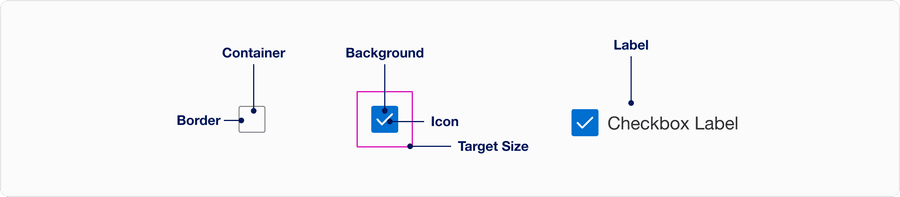
| State | Description | Required |
|---|---|---|
| Border | Adds sufficient contrast to pass accessibility in unselected and error state. | Yes |
| Container | Container is 24 x 24px | Yes |
| Background | Background color can convey tone of default, selected or indeterminate. | Yes |
| Icon | It can allow the user to understand the state of the checkbox. Use check for selected or minus for indeterminate. | Yes |
| Target Size | Tap target is 48 x 48px to meet the minimum accessibility requirements and to be able to fit 8x system. WCAG 2.1 success criterion 2.5.5 | Yes |
States
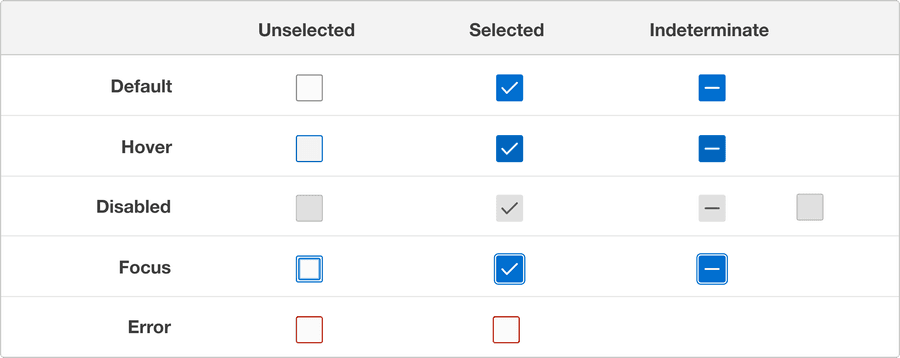
| State | Description |
|---|---|
| Default | Users can tap or click the text label or the checkbox to select or deselect an option. |
| Hover | A change in color indicates to a user its clickable when the cursor hovers over a selection. |
| Disabled | It’s an option where it’s visible but not interactive. Our recommendation is not to display if not needed. |
| Focus | A focus outline appears around visual element when a user navigates using keyboard controls. |
| Error | Use error state if a selection is needed to move forward and include an error message on why its invalid to avoid accessibility issue. |
Questions?
Connect with the DLS Team on Slack or by email.
Resources
Check out additional resources.