
Breadcrumbs
Breadcrumbs are a secondary navigation method that show content hierarchy or traces someone’s path. They allow a user to move quickly up to a higher level or to a previous step.
On this page
Best Practices
Breadcrumbs allow users to locate where they are in the content hierarchy or journey.
- To give users context to their place in the hierarchy or to trace someones path
- To provide an additional way to navigate a site
- When you have more than two levels of hierarchy
- Match your breadcrumbs to your page URL structure or have a unique URL
- For primary navigation
- Inside modals
- To show user progress, use multi-step tracker instead
Variations

| Variation | Description |
|---|---|
| Default | Default breadcrumb can be used for showing content hierarchy or traces someone’s path. |
| With Home Icon | Use for breadcrumbs that start their trail at the home page as a way to save horizontal space. |
Recommendations
Breadcrumb Links
Use short and descriptive labels that match the title of the location the link navigates you too.
- Give each breadcrumb in the trail a label unless using the home icon, home icons should only take you to the home of a set of webpages.
- Keep titles short when possible
- Don’t remove labels
- Don’t truncate labels
Layout
Here are examples of how to use breadcrumbs on a page, remember it’s important to have an alternative navigation and a title on the page along with breadcrumbs.
Titles
- Each page must have a title and logical structure that is visual but also programmatically
determined using HTML components such as
<h1/>or<h2/>. Sighted users perceive structure and relationships through various visual cues, making these structures and relationships programmatically determined or available in text ensures that important information will be perceivable to all. Adaptable accessibility guidelines
Navigation
- Breadcrumbs allow you to retrace you steps but don’t provide a way to navigate the full set of web pages.
- Navigation should always be found in the same position in the same relative order, unless a change is initiated by the user. This includes breadcrumbs and any other navigational mechanism that are repeated on multiple Web pages within a set of Web pages. Web content accessibility guidelines call out the need to locate specific information or functionality more than once. Ensuring that repeated components occur in the same order on each page of a site helps users become comfortable that they will be able to predict where they can find things on each page. This helps users with cognitive limitations, users with low vision, users with intellectual disabilities, and also those who are blind.
Breadcrumbs on a page
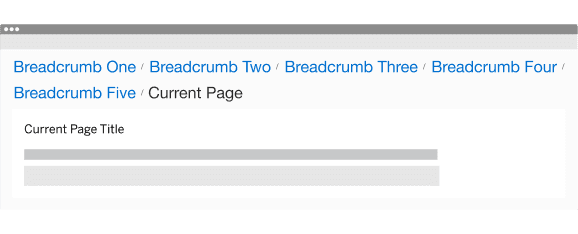
Breadcrumbs on a page with side navigation

Responsive
Breadcrumbs will wrap to a new line on smaller breakpoints or screen sizes.
All pages must be responsive and reflow to a minimum of 320px. Breadcrumb will reflow to a minimum of 200px (12.5rem), to allow for margins and grid gutters. Reflow accessibility standard
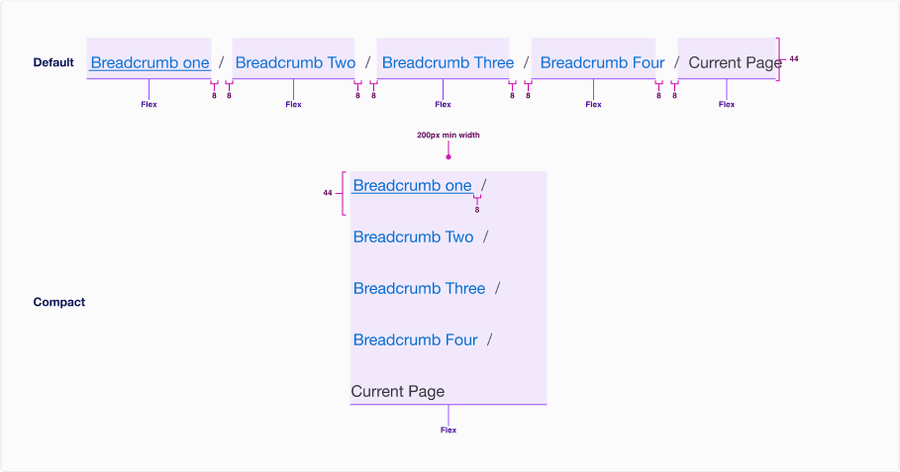
When the breadcrumb is too long for horizontal space, breadcrumbs wraps to another line below.
Questions?
Connect with the DLS Team on Slack or by email.
Resources
Check out additional resources.