
Multi-Step Tracker
Multi-step trackers indicate a customer’s progress through a series of linear, discrete steps. While the individual steps may be unrelated to each other in content, as a whole they are required for the customer to complete the intended action.
On this page
Anatomy
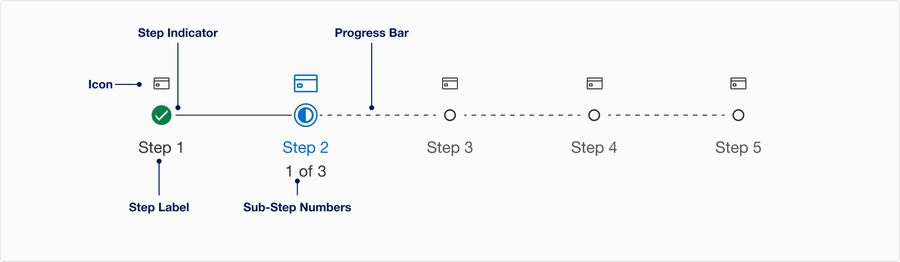
| Name | Description | Required |
|---|---|---|
| Step Indicator | Completed, current and incomplete. The step indicator shows the current step and and if there are sub-steps. | Yes |
| Progress Bar | Solid bright gray line indicates completed step. Dashed gray line indicates incomplete step. | Yes |
| Step Label | Name of step, used to inform the user of Completed, current and upcoming steps. | Yes |
| Sub-step | Used to indicated the number of sub-steps. Sub-step title should be somewhere on the page. Using sub-steps | Yes |
| Icon | The icon should help reinforce the Label. Choose the appropriate Icon based on the Step Label. | Yes |
Questions?
Connect with the DLS Team on Slack or by email.
Resources
Check out additional resources.