
Internationalization
Users of our design system can modify their implementation to build experiences that work everywhere by allowing users to complete journeys in their preferred language and locale. The guidelines below consider languages that use different alphabets, spacing, word length, and right-to-left reading direction.
On this page
Icon Best Practices
Icons are visual elements that provide information to the user or guide the user to follow a common action. When designing for another locale, it is important to consider cultural semantics within that region so that an icon delivers the intended meaning.
- Check semantic meaning is not different in different regions
- Mirror directional icons for RTL text layout
- Ensure the iconography remains similar to the physical world, keeping a balanced, friendly tone especially when using languages other than English
- Use icons without understanding their semantic meaning in the locale you are designing for
- Use icons that are meant to be read left-to-right with right-to-left text
Directional Icons
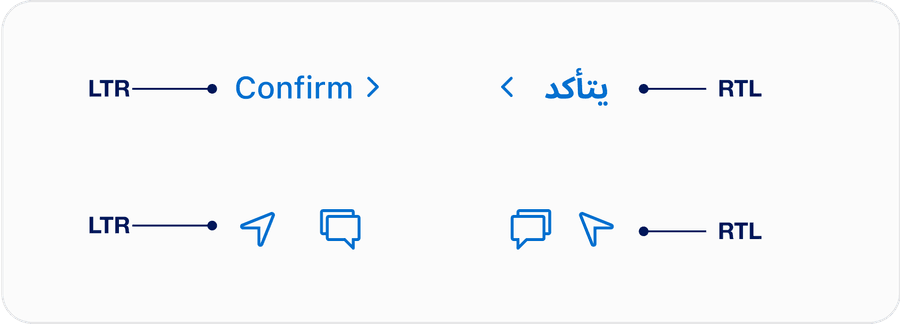
When designing for other locales, specifically locale’s that use a right-to-left (RTL) language, it is essential to ensure you are formatting your directional icons correctly. For example, the below link should have a chevron facing the appropriate direction that signals a forward direction.
For a RTL language, you want to make sure to reverse the order of the chevron. See below for an example in Arabic.
Additional examples that showcase how to mirror icons that have a direction in order to align with RTL language.
Questions?
Connect with the DLS Team on Slack or by email.
Resources
Check out additional resources.